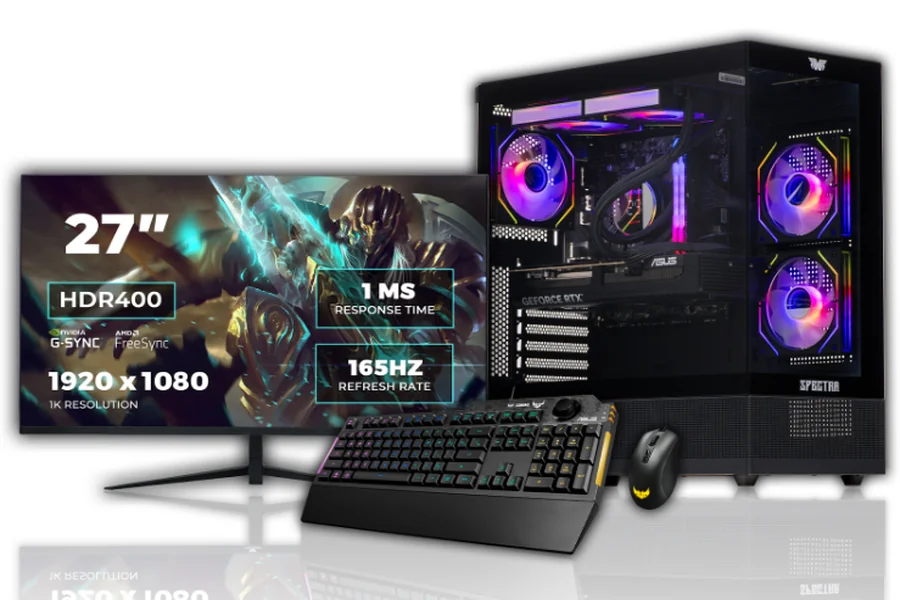
Building the optimal gaming setup demands the appropriate balance of power, cooling, and style to create a flawless experience.
Finding the appropriate pc for gaming is the first step toward a superior experience. Many players feel overwhelmed by the endless hardware choices available nowadays. However, setting up a great station is easy when you follow a clear plan.
This guide covers everything, whether you’re looking for the best budget gaming PC or top-tier power in the UK. We will cover components, cooling, and the best accessories to complete your desk. So, read to the end!
Choosing the Right Core Components for Your Rig
The heart of your setup is the power itself. You need a machine that handles modern titles without any lag or stuttering. If you pick the wrong pieces, you can face crashes or bad frame rates.
Selecting a Powerful Processor (CPU)
The CPU acts as the brain of your computer. Look for at least six cores for a seamless experience. Fast-paced action games benefit from high clock speeds. Modern games rely largely on how fast your CPU can process logic and physics.
Picking the Best Graphics Card (GPU)
Your GPU dictates how lovely your games seem. If you want 4K visuals, invest in a high-end GPU. A mid-range card is ideal for 1080p gaming. The GPU is usually the most expensive aspect of your build.
Memory and Storage Essentials
Always aim for at least 16GB of RAM. This guarantees that your PC is capable of multitasking. For blazingly quick boot times, choose an SSD for your operating system. For today’s gaming demands, conventional hard drives are too slow.
| Component | Purpose | Recommended Spec |
| CPU | Processing power | Intel i5/i7 or Ryzen 5/7 |
| GPU | Visual rendering | NVIDIA RTX or AMD Radeon |
| RAM | Multitasking | 16GB – 32GB DDR4/DDR5 |
| Storage | Load speeds | 1TB NVMe SSD |
| PSU | Power delivery | 650W – 850W Gold Rated |
Keeping Your System Cool Under Pressure
Performance is negatively impacted by heat. If your components get too hot, they will slow down to protect themselves. Thermal throttling is the term for this.
Air Cooling vs Liquid Cooling
Air coolers are affordable and incredibly easy to maintain. To disperse heat, they employ fans and aluminium heatsinks. Liquid cooling is quieter and typically more efficient for overclocking. It also adds a sleek, modern look to your internal case. Both options are viable for the best budget gaming pc in the UK, depending on your case size.
Optimising Case Airflow
Proper airflow requires a balance of intake and exhaust fans. Front fans should bring cool air in. The rear and top fans should push hot air out. This continual cycle maintains your hardware working at peak levels for hours. To preserve this effectiveness, clean your dust filters on a regular basis.
Essential Accessories for an Immersive Experience
Your PC is only part of the equation. Your choice of peripherals will determine how you engage with your virtual environments. High-quality accessories can improve your reaction times and overall enjoyment.
High Refresh Rate Monitors
A standard screen might limit your skills. Look for a monitor with at least a 144Hz refresh rate. This provides you with a competitive advantage and makes movement look fluid. Fast response times prevent “ghosting” in quick scenes.
Mechanical Keyboards and Precision Mice
Mechanical switches offer tactile feedback like mechanical switches do. Pair this with a lightweight mouse that has a high DPI sensor. For first-person shooters, accuracy is crucial. Wired mice often provide the lowest latency for serious gamers.
Ergonomic Seating and Desks
Do not overlook your comfort during long sessions. Back pain can be avoided by using a chair with lumbar support. Ensure your desk has enough room for your mouse pad and displays.
How to Find the Best Budget Gaming PC
You do not need to spend thousands to enjoy the latest hits. Many entry-level systems offer exceptional value for money. Focus on a strong GPU and CPU combo first. You can always update your RAM or storage later if your budget grows.
Look for pre-built choices that offer warranties for peace of mind. Many shops provide balanced systems that outperform custom builds in the same price range. A best budget gaming pc should nevertheless contain an SSD to guarantee the Windows experience feels smooth and speedy.
Understanding Component Compatibility
When building or buying, ensure all elements operate together. Your motherboard must match your CPU socket. Your power supply must have enough watts for your GPU. If you purchase a pre-built pc for gaming in the UK, these technical inspections should already be completed by professionals.
Future-Proofing Your Investment
Technology moves fast. Try to buy hardware that supports the latest standards like PCIe 5.0 or DDR5 memory. This keeps your computer from becoming outdated for many years. Even the best budget gaming PC may be future-proofed with a smart motherboard purchase.
Customising Your Aesthetic
Gaming is a hobby built on personality. Many gamers love to employ RGB lights to fit their room’s décor. You may sync your lights with your in-game activities for enhanced immersion. Clear side panels allow you to show off your clean cable management.
Cable Management Tips
Tidy cable does more than just look good. They improve airflow by reducing barriers inside the casing. Use zip ties or velcro straps to bundle wires together. Most modern cases have hidden compartments for extra cable slack.
Sound and Audio Quality
A decent headset allows you to hear enemy footsteps clearly. Spatial audio can offer you a 360-degree perspective of your surroundings. If you prefer speakers, look for a 2.1 system with a dedicated subwoofer for deep bass.
Software and Driver Optimisation
Once the hardware is ready, you must prepare the software. Always get the newest drivers for your graphics card. These updates sometimes provide performance boosts for new games.
Game Launchers and Libraries
Organise your games using platforms like Steam, Epic Games, or GOG. Use a separate drive for your game library to keep your main drive clean.
Monitoring Performance
Use software to track your temperatures and frame rates while playing. This helps you detect whether any portion of your pc for gaming is struggling. If frames drop, you might need to alter your in-game settings.
Level Up Your Gaming Setup Now!
Are you prepared to turn your space into a professional gaming arena? Veno Scorp offers top-notch pc for gaming that are customized to meet your unique requirements and financial constraints. They understand the passion behind every build and deliver the assistance you deserve. Grab your dream rig now and experience gaming like never before!